Accounts
Accounts is a task that allows for configuration of user accounts on supported devices. The exact properties that can be configured varies between firmwares, as per the table below:
| Firmware | Password | Username | Raw Hash | Public Keys |
|---|---|---|---|---|
| WeOS 4 | Yes | Yes | Yes | Only for Admin |
| WeOS 5 | Yes | Yes | Yes | Yes |
| Ibes | Yes | No | No | No |
| XRD | Yes | No | No | No |
Configuring the account setup for an XRD also sets up the API account associated with the device.
Interface Components


Autofill section
Collapsed by default under the label "Autofill", this section of the interface allows for filling out a group of account that can then be copied to all selected devices.
Create/Copy public key
Located to the top right of the interface, this button is an easy short-hand for generating a public/private RSA key-pair associated with the running machine. When clicked, it will check whether or not an RSA key pair exists on the machine, and if not, create one. The public key of the RSA pair will then be copied to the users clipboard.
Device view
Picture above is the view for a singular device, in this case a RFI-219-T3G with the hostname redfox at the IP address 198.18.1.2. This is a WeOS 4 device, and as such all the components are visible. They are as follows:
Username
This box specifies the username to associate with the account, it may be read-only if the device firmware does not support non-default usernames.
Password
This box specifies the password to associate with the account.
Hash
This box specifies the hashed version of the password, useful for copying authentication between devices without explicit knowledge of passwords.
Any hash specified will be ignored in favor of the Password box if it is non-empty.
Public keys
This box specifies the public keys that can be used for authentication purposes. An account can usually have more than one public key associated with it. Filling out one line of the public key box will make another line appear beneath it, as long as there is space on the device for more public keys for the account.
If the password box and hash box is left empty on an account that supports and is configured with public key authentication, the only way to access the account will be via public key authentication.
Reduced view
In comparison to the above full view for a WeOS 4 device, below is pictured the view for an Ibex device, which has less supported features in this view:
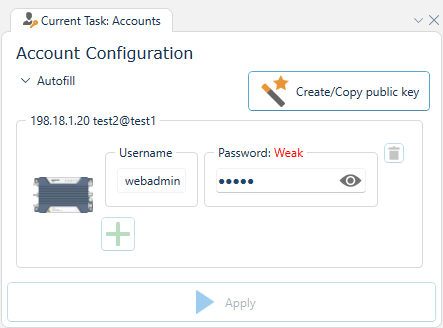
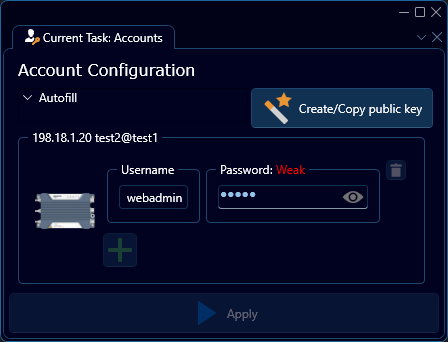
As can be seen, only the username and password box is visible, the username cannot be editted and no more accounts can be created.