Alarm
Alarm is a task that allows for configuration of link up/down alarms on device ports.
Interface components
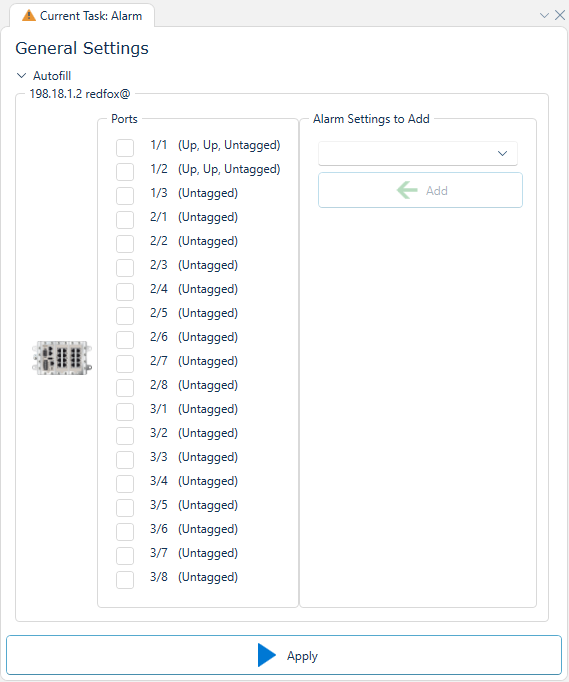

Depicted above is the user interface of this task, where we can see a list of devices, in this case a singular one, each containing a list of ports and a template selector called "Alarm Settings to Add". Above the device list exists an autofill section that is handy for rapidly configuring many devices.
Each port in each devices port list indicates it's current link/enabled status, as well as if it's considered tagged or untagged on any VLAN. Each port can either be configured manually with a port alarm, or a preset selection amongst the following:
| Preset | Description |
|---|---|
| Enable on all tagged ports | Set alarm as enabled on all ports that are tagged in at least one VLAN. |
| Enable on all untagged ports | Set alarm as enabled on all ports that are untagged in at least one VLAN. |
| Enable on all FRNT ports | Set alarm as enabled on all ports that are configured to be part of at least one FRNT ring. |
| Enabled on all MRP ports | Set alarm as enabled on all ports that are configured to be part of at least one MRP ring. |
| Enabled on all RSTP ports (Non Admin Edge) | Set alarm as enabled on all ports that are configured for RSTP meshing, except those configured as an admin edge. |
| Enabled on All ports currently having link status up | All ports that are currently up will have alarms enabled, except if that port connects directly to the configuring PC. |
| Disable on all Ports | No port will have alarm enabled |