WeConnect
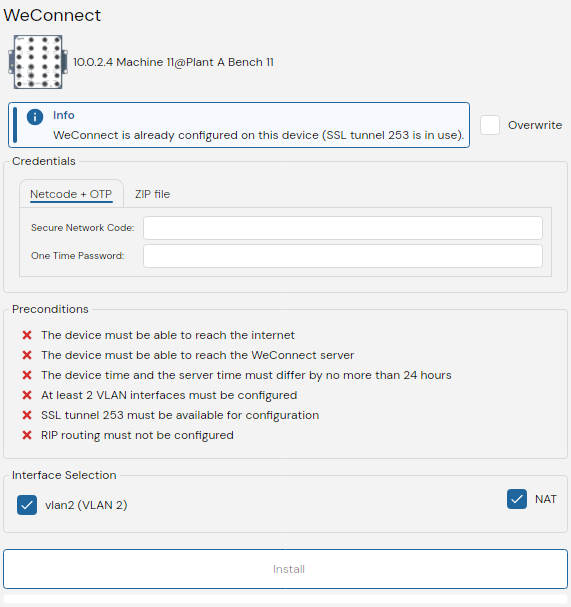
WeConnect is a task that provisions a secure VPN tunnel between a Westermo device and the WeConnect cloud platform. The wizard guides you through precondition checks, credential entry, interface selection, and automated provisioning of SSL tunnels, firewall rules, and RIP routing.
To use WeConnect, the target device must have an active internet connection and have a DNS server capable of identifying the WeConnect server.
Preconditions
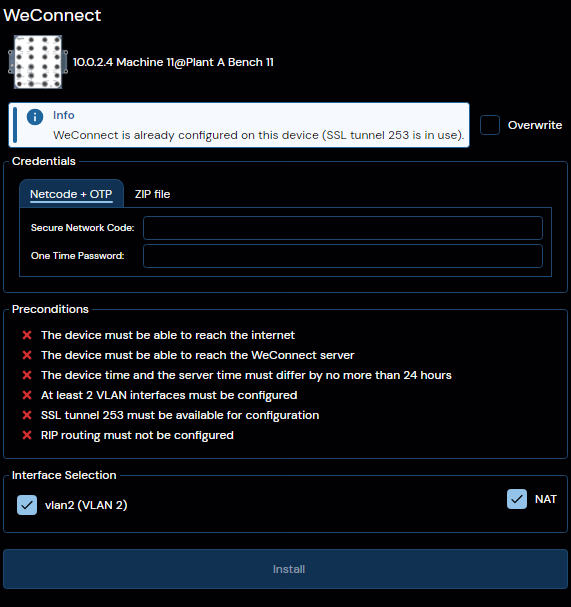
Before provisioning can begin, WeConfig automatically verifies that the device meets the following requirements:
| Precondition | Description |
|---|---|
| VLAN interfaces | At least two VLAN interfaces must be configured on the device. |
| SSL tunnel 253 | SSL tunnel 253 must be available (not already in use by another configuration). |
| RIP routing | RIP routing must not already be configured on the device. |
| Internet reachable | The device must be able to reach the internet. |
| WeConnect server reachable | The device must be able to reach the WeConnect server. |
| System clock | The device system clock must be within 24 hours of the server time. |
If any precondition is not met, the wizard will indicate the issue and provisioning cannot proceed until it is resolved.
Interface Components
Credentials
WeConnect supports two credential modes for authenticating with the WeConnect service:
| Mode | Description |
|---|---|
| Netcode + OTP | Enter a Secure Network Code and a One Time Password provided by Westermo. |
| ZIP file | Select a ZIP file containing the configuration bundle downloaded from the WeConnect portal. |
Choose the appropriate mode and provide the required credentials to proceed.
Interface Selection
Select which VLAN interfaces on the device should be routed through the WeConnect tunnel. You may also configure NAT (Network Address Translation) for WeConnect traffic in this stage.
Provisioning
Once credentials and interfaces are confirmed, WeConfig automatically provisions the device. The following steps are performed:
- Connectivity check — Verifies the device can reach the WeConnect server.
- SSL tunnel configuration — Creates and configures SSL tunnel 253 with the provided credentials.
- RIP routing — Configures RIP routing for the selected interfaces.
- Firewall rules — Adds the necessary firewall rules to allow WeConnect traffic.
Progress is displayed in real time. Do not disconnect or power off the device during provisioning.
Provisioning modifies the device's SSL tunnel, firewall, and RIP routing configuration. It is recommended that you have a backup of the device configuration before proceeding.
Managing Existing Configurations
If a device already has a WeConnect configuration, the wizard offers the following actions:
| Action | Description |
|---|---|
| Reinstall | Re-provisions the device with a fresh WeConnect configuration, replacing the existing one. |
| Uninstall | Removes the WeConnect configuration from the device, including the SSL tunnel, firewall rules, and RIP routing entries. |
Troubleshooting
The following errors may occur during WeConnect provisioning:
| Error | Possible Cause | Resolution |
|---|---|---|
| Device not supported | WeConfig does not support WeConnect configuration on the selected device. | - |
| TLS certificate validation failed | The device could not validate the WeConnect server's TLS certificate. | Check the device system clock and ensure root certificates are up to date. |
| System clock too far off | The device clock differs from the server by more than 24 hours. | Synchronize the device clock via NTP or manual configuration. |
| Configuration bundle corrupt | The provided ZIP file is damaged or incomplete. | Re-download the configuration bundle from the WeConnect portal. |
| Credentials rejected | The Secure Network Code or One Time Password was not accepted by the server. | Verify the credentials and ensure the OTP has not expired. |
| Network connectivity issue | The device cannot reach the internet or the WeConnect server. | Check the device's network configuration and upstream connectivity. |
| SSL tunnel import failed | The SSL tunnel configuration could not be applied to the device. | Ensure tunnel 253 is available and the device supports SSL tunnels. |
| RIP or firewall configuration failed | The RIP routing or firewall rules could not be applied. | Check for conflicting RIP or firewall configurations on the device. |