Import Devices from CSV File
Import Devices from CSV File allows for importing a project from a Comma Separated Value (CSV) file.
To import devices into the project from a CSV file browse for the CSV file and specify encoding, delimiter, and whether the file has headers or not.
The defaults are often good enough. Use the combo boxes to specify which column in the CSV file should map to which device attribute. Click Import to start.
If the CSV file has headers, WeConfig will attempt to map columns based on the header names. If no headers are present, the columns must be mapped manually.
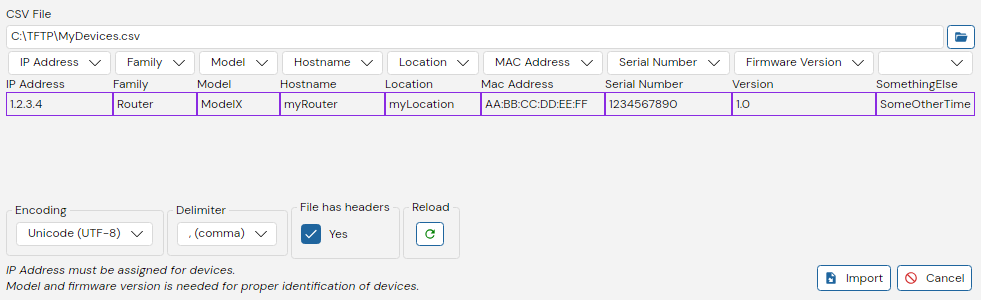
The CSV file must have the following columns:
- IP Address (In the format of IPv4, e.g 1.2.3.4)
- Family
- Model
Other following columns are optional:
- Hostname
- Location
- Mac Address (in the format of
XX:XX:XX:XX:XX:XXorXX-XX-XX-XX-XX-XXorXXXXXXXXXXXX) - Serial Number
- Version
Additional columns are ignored.
WeConfig will attempt to map columns based on header names if the CSV file has headers. If no headers are present, the columns must be mapped manually.
Below are found a few examples of valid CSV files.
IP Address,Family,Model,Hostname,Location,Mac Address,Serial Number,Version,SomethingElse
1.2.3.4,Router,ModelX,myRouter,myLocation,AA:BB:CC:DD:EE:FF,1234567890,1.0,SomeOtherTime
1.2.3.4,Router,ModelX,myRouter,myLocation,AA:BB:CC:DD:EE:FF,1234567890,1.0
1.2.3.4,Router,ModelX,,
1.2.54.25,Routeral,ModelY,,Name
12.2.3.4,Routerei,ModelZ,Home,
13.2.3.4;Router;ModelX;;
14.2.3.4;Routeral;ModelY;;Name
1.25.3.4;Routerei;ModelZ;Home;
111.2.3.4;Router;ModelX;;
1.222.3.4;Routeral;ModelY;;Name
1.2.32.4;Routerei;ModelZ;Home;
1.22.3.4 Router  ModelX      <empty>
1.2.33.4 Routeral ModelY     <empty> Name
1.2.3.45 Routerei ModelZ     Home